
Help Desk
Paystubs, PTO, Clock In/Out, and support — everything our caregivers and staff need, all in one place.
Contact Us
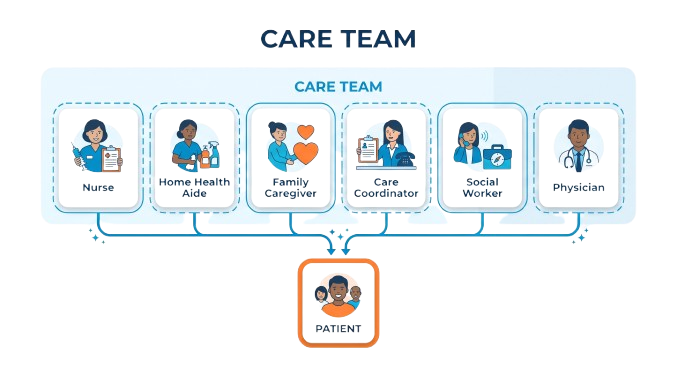
One Help Desk For Every Role On The Care Team
From nurses and Home Health Aides to care coordinators and family caregivers, everyone who supports our clients can rely on the same Help Desk for payroll, PTO, supplies, and general support.
Employee Request Center
Pick a request type below and send it to our team. A member of staff typically replies within one business day.
General Request
Have a question or something else you need help with? Send it our way.
Help Desk at Cottage Home Care Services
Quick, reliable access to the tools our caregivers and staff use every day — clock in and out, check your PTO balance, or view your pay stub, wherever you are.
What You Can Access
- EVV Clock In/Out: Clock in and out through our Electronic Visit Verification (EVV) system to keep your work hours accurately recorded.
- PTO Balance: Track your vacation time, sick leave, and personal days through a secure online platform.
- Pay Stub: Instantly access your latest pay stubs and payment history for your financial records.
Clock In & Clock Out Instructions
These telephone-based steps follow New York State Medicaid’s Electronic Visit Verification (EVV) requirements. Use the correct number for your agency, follow the prompts in order, and enter duty codes when asked — this keeps payroll on time and visit records compliant.
Cottage Home Care
866-982-3022Clock In
- Dial 866-982-3022 from the patient’s home phone.
- Press 1 to initiate the Clock-In process.
- Enter the caregiver’s 6-digit assignment ID.
- Confirm the entry.
Clock Out
- Dial 866-982-3022 from the patient’s phone.
- Press 2 to begin the Clock-Out process.
- Enter the caregiver’s 6-digit assignment ID.
- Optionally, enter any applicable duty codes.
- Press 000 to complete the call.
Duty codes: 103, 106, 111, 112, 206, 301, 411, 502, 511.
Celestial Home Care
866-979-3669Clock In
- Dial 866-979-3669 from the patient’s phone.
- Press 1 to clock in.
- Enter the caregiver’s 6-digit assignment ID.
Clock Out
- Dial 866-979-3669 from the patient’s phone.
- Press 2 to clock out.
- Enter the caregiver’s 6-digit assignment ID.
- Enter any applicable duty codes.
- Press 000 to complete the call.
Need help with clocking in, duty codes, or an assignment ID? Contact our administrative office at (516) 367-2266 or info@cottagehomecare.com.
Why Use the Help Desk
- 24/7 Accessibility: Reach important information and resources anytime, from any device, at home or on the go.
- User-Friendly Interface: A simple, fast, and secure portal designed to make your work-related tasks hassle-free.
- Efficient Time Management: Check schedules, PTO balances, and pay information without long wait times or paperwork.
- Employee Support: Part of our broader commitment to our team, so your questions get addressed promptly.
Getting Started
Visit this Help Desk page and use the section for the task you need — the EVV instructions above for clocking in and out, or the Quick Access links to log in and view your PTO or pay stub. If you run into any trouble, our team is always ready to help.
Stay connected with Cottage Home Care Services on Facebook, Instagram, X, TikTok, and YouTube for news, announcements, and community events. We’re proud of our team and committed to making your experience as smooth, efficient, and rewarding as possible.
Service Area
Cottage Home Care serves downstate New York
Cottage Home Care serves families across the Bronx, Brooklyn, Manhattan, Queens, Staten Island, Nassau, Suffolk, and Westchester Counties, backed by more than 4,000 trained, expert caregivers and Registered Nurse input on every care plan, focused on safety, dignity, and well-being. Offices in Freeport, Queens, and Jamaica.